 最後一戰:戰役進化Fetching price~ HK$ 398.00
Selezioni popolariVedi tutto
123456789101112
12 Best Mystery Games on PC (2026)
12 Best Space Sim Games on Steam (2026)
12 Best Story-Rich Games to Play (2026)
12 Best Turn-Based Tactics Games on Steam (2026)
12 Best Puzzle Games on Steam (2026)
12 Best Games to Play with Friends on PC (2026)
12 Best JRPGs on Steam (2026)
12 Best City Builder Games on Steam (2026)
12 Best Zombie Games on Steam (2026)
12 Best Free Indie Games on Steam (2026)
12 Best Short Indie Games to Try (2026) — Done in One Evening
12 Best Cozy Games on Steam (2026)
Giochi simili popolariVedi tutto
Games Like PowerWash Simulator - 12 Best Relaxing Cleaning and Restoration PicksGames Like ARC Raiders - 12 Best Extraction and Co-op Survival ShootersGames Like PEAK - 12 Best Co-op Climbing and Survival PicksGames Like R.E.P.O. - 12 Best Co-op Horror PicksGames Like Clair Obscur: Expedition 33 - 12 Best Turn-Based RPG PicksGames Like Path of Exile 2 - 12 Best Action RPG and Loot PicksGames Like Road to Vostok - 12 Best Hardcore Survival Shooter PicksGames Like Mina the Hollower - 12 Best Top-Down Action and Zelda-Like PicksGames Like Slay the Spire 2 - 12 Best Roguelike Deckbuilders to Play NextGames Like Resident Evil Requiem - 12 Best Survival Horror PicksGames Like Baldur's Gate 3 - 12 Best CRPGs and Turn-Based RPGsGames Like Monster Hunter Wilds - 12 Best Co-op Hunting and Action RPG PicksGames Like Hollow Knight: Silksong - 12 Best Metroidvania Picks (2026)Games Like Dead by Daylight - 12 Best Asymmetric & Co-op Horror PicksGames Like Final Fantasy VII Rebirth - 12 Best Action RPG & JRPG PicksGames Like Forza Horizon 6 - 12 Best Open-World Racing & Driving Picks (2026)Games Like Solarpunk - 12 Best Cozy Survival and Crafting GamesGames Like 007 First Light - 12 Best Stealth and Spy GamesGames Like Subnautica 2 - 12 Best Underwater and Alien-World Survival GamesGames Like Hell Let Loose - 12 Best Tactical Milsim Shooters
Recensioni popolariVedi tutto

Hades II — Recensione

Clair Obscur: Expedition 33 — Recensione

Katana ZERO — Recensione

The Long Dark — Recensione

Shift At Midnight — Recensione

Middle-earth™: Shadow of Mordor™ — Recensione

The Mermaid Mask — Recensione

Killing Floor 2 — Recensione

The Outlast Trials — Recensione

American Truck Simulator — Recensione

Voidling Bound — Recensione

Go-Go Town! — Recensione

Desktop Explorer — Recensione

Dead as Disco — Recensione

Crushed In Time — Recensione

Beastro — Recensione
Halo: Campaign Evolved Low Graphics Settings Deliver Big Performance Gains, Spark Debate
PC Gamer tested the Halo: Combat Evolved remake on an RTX4070 Super, and its verdict is blunt: in normal play, the visual difference between Ultra and the low preset is small, while Ultra costs roughly 20% of the frame rate. For most players, the smarter move is not chasing the top preset, but keeping the game sharp, responsive, and stable.
That is a useful finding for Halo: Combat Evolved, a shooter that depends on clean movement and readable combat as much as scenic detail. PC Gamer's point is not that Ultra does nothing. It is that the gains are easy to miss once you are moving, aiming, and fighting.

In the test, Ultra mainly improves lighting, shadows, vegetation detail, and secondary effects. Those upgrades are visible, but they do not transform the game during normal missions, where players are not standing still to compare foliage. A modest lift in atmosphere is welcome. A roughly 20% frame-rate hit is harder to justify.
That is why the low preset looks like the best-value option. The low preset does not make the game look stripped back. It keeps most of the visual presentation intact, while trimming less essential flourishes and returning a meaningful amount of performance.
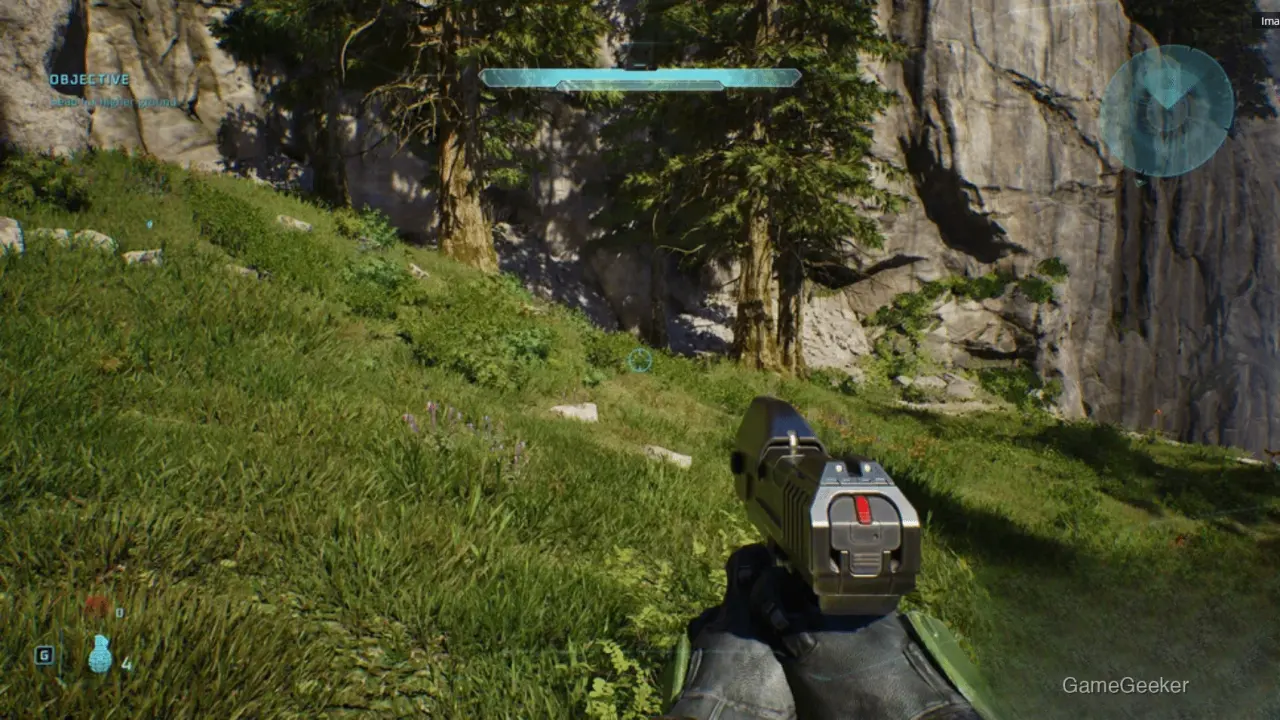
For PC players who do not want to use image scaling and care more about stable frame rates, the recommendation is straightforward: start with low. The trade-off is clear, and it favors feel over marginal visual polish. In a shooter, that is usually the right priority.
The bigger issue outside the standard graphics presets is motion blur. PC Gamer's editor recommends that all players turn it off, because the effect is too strong and harms both image quality and how the game feels to control. A large number of players are also sharing ways to manually disable various post-processing effects. For anyone who likes clean screenshots or crisp target tracking, heavy motion blur can make the picture feel smeared rather than cinematic.

Handheld players have a different path. For the ROG Xbox Ally X, PC Gamer recommends using the very low preset with the medium FSR setting at 1080P, aiming for a balance between visual quality and smooth performance. It is not the showpiece option, but it is practical. Halo's combat needs clear feedback, and a stable frame rate matters more than an extra layer of shadow detail.

The practical settings advice is simple. If you are a typical PC player, begin with the low preset, turn off motion blur, and make sure the frame rate is steady before raising individual settings. Ultra is better suited to screenshot comparisons, hardware showcases, or players who are willing to pay a performance cost for small visual gains.
The conclusion is not that the remake looks bad on Ultra. It is that ordinary players do not need Ultra to get most of what the game is offering. The low preset keeps the core image largely intact, improves frame rate substantially, and makes more sense for anyone who values consistent play over minor visual extras.
最後一戰:戰役進化Fetching price~ HK$ 398.00





Commenti 0
Ci interessa la tua opinione
Partecipa alla discussione e condividi la tua opinione su questo gioco.
Ancora nessun commento. Scrivi il primo.