ニュース
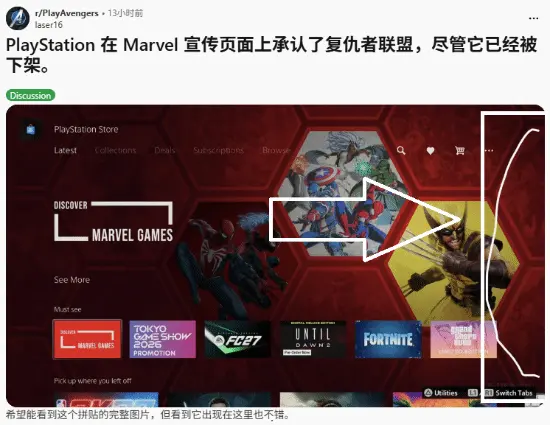
After 3 Years Offline, Marvel's Avengers Accidentally Appears on a PS Collection Cover, Sparking Debate
September 12 saw Marvel’s Avengers on a PS Store Marvel bundle cover—likely oversight—three years offline. Marvel’s Wolv
















I finally got hold of my phone on Saturday afternoon. I was originally planning to clean up my photo album and messages, but the first thing I saw was Apple prompting a system update. For someone like me, who scrolls on the phone during the daily commute and only has time to tinker with devices on weekends, this matters far more than putting on a new wallpaper. After all, what’s stored on a phone isn’t just something as simple as game save data—it also holds payment information, photos, and all kinds of accounts. If something really goes wrong, the cost feels worse than unpaid overtime over the weekend.

This reminder came from Apple officially, dated April 15. The core message was very straightforward: older versions of iOS carry a risk of data theft. Security researchers recently discovered that some malicious web content specifically targets outdated iOS versions. As long as you click a malicious link or visit a compromised website, the personal data on your iPhone could be stolen.
Apple moved fairly quickly on this as well. After discovering the vulnerability, it launched an investigation and addressed the issue through software updates, trying to block off the attack route as much as possible. The company also made it clear that keeping software up to date is key to protecting the security of Apple products. In other words, this update is not one of those “install it whenever you have time” optimization packages—it’s more like replacing the core of your door lock with a new one. The longer you delay, the longer the risk hangs over you.
As for specific versions, devices already updated to the latest version can avoid these reported attacks. Devices running iOS 15 through the latest patch for iOS 26 are already protected. For older devices that cannot upgrade to the latest major version, Apple also issued dedicated security updates for iOS 15 and iOS 16 on March 11; but if you are still on iOS 13 or iOS 14, then you must upgrade to iOS 15 or above to receive this protection.
That said, the most worry-free option here is still automatic updates. Starting from April 1, Apple has already pushed iOS 18.7.7 to more devices. Users who have automatic updates enabled can basically receive the security protection automatically. For office workers, this kind of experience is like food delivery defaulting to no delivery fee—peace of mind is itself a kind of value for money, and you do not need to carve out extra time just to figure out whether the update is worth it.
If I had to give one very practical suggestion, my view is this: it is not a question of “whether it is worth updating,” but rather a question of “the later you do it, the more you lose.” Many people usually find system updates troublesome—they worry about lag, battery drain, or app incompatibility. Those concerns are understandable. But compared with a data breach, the ten or so minutes spent updating really is not a high cost. It is like watching two fewer short videos on the subway, yet patching up your phone’s security in the process.
How should I put it? Updating your phone’s operating system works on the same logic as applying a patch to a game. You do not have to chase new features on day one, but it is best not to delay security patches. Especially now, many attacks are triggered through web pages and links, so the barrier is lower than people imagine—it is not only “people who install random software” who get hit. For iPhone users, the safest move in this round comes down to one sentence: check your version first, then update immediately.




コメント 0
ご意見をお聞かせください
このゲームについての感想や評価をお寄せください。
コメントはまだありません。最初の一件をどうぞ。