
News
over the hill launches with introductory Steam offer and lower-priced key listings
Funselektor’s off-road exploration game is out on Steam at $19.99 with an introductory offer. Approximate third-party ke
















Anyone who has spent 120 hours grinding a handheld turn-based game to complete the full Pokédex is bound to be especially sensitive to system updates like this. The new feature Microsoft was revealed to be pushing on April 10 is the Xbox Gamepad Cursor for handheld users. Put simply, it makes the controller behave more like a controllable mouse, addressing the long-standing problem of Windows interfaces being awkward to tap, scroll, and switch through on handhelds.
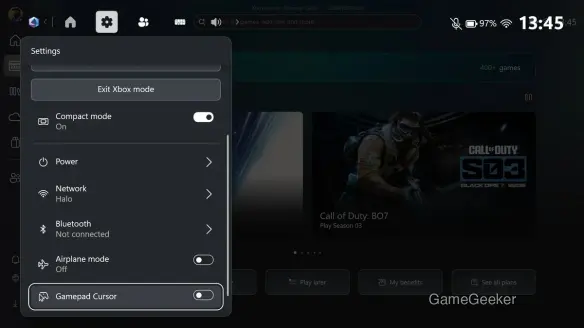
At first glance, this design felt exactly right to me—like that satisfying moment in a JRPG when the menu logic is finally polished to the point where everything just flows. Based on the information currently available, the left stick moves the cursor, the right stick simulates the mouse wheel, and the A button handles clicks. The entire mapping scheme is very straightforward, with no artificially complicated learning curve. For players who often use a handheld to enter their game library, open settings, or switch windows, this is clearly more intuitive than slowly nudging around with a touchpad or directional buttons.
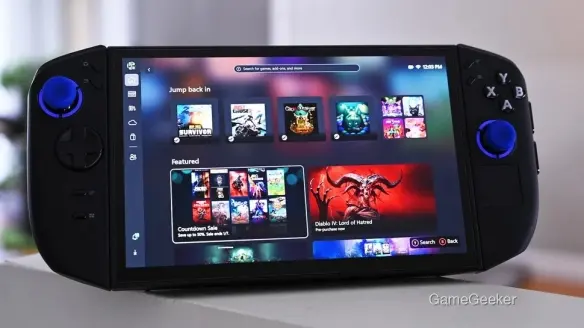
At its core, this move from Microsoft is another step toward completing the final pieces of the Xbox cross-platform experience. Previously, the biggest issue with running Windows on handhelds was not that the performance numbers looked unimpressive, but that system-level interaction always carried the awkward feeling of “built for keyboard and mouse, with controller support as an afterthought”—like a classic JRPG suddenly stuffed with a few completely out-of-place QTEs. Frequently switching input devices does more than hurt efficiency; it also breaks immersion, and on handhelds—where the whole appeal is being able to pick up and play at any moment—that sense of disconnect becomes even more noticeable.
That said, if you want to try the feature early at this stage, you still need to join the Xbox Insider program first. The activation path is already clear: go to the settings in Xbox Game Bar, find the option at the bottom, enter the More Settings menu, and then turn on the Gamepad Cursor switch. The barrier to entry is not especially high, but it also shows that the feature is still in the testing and polishing phase. Ordinary users who prioritize stability may still want to wait for the full rollout.
From a broader trend perspective, this is really the kind of usability improvement that was always going to arrive once handhelds became more PC-like. More and more players now want a single device to handle gaming, store browsing, and system adjustments all at once, so whether “a controller can smoothly navigate the entire system” is becoming just as important as frame rate. It’s a shame that optimizations like this are rarely as eye-catching as new hardware or new chips, but the people who actually use handhelds every day are the ones who can most clearly feel the value of updates like this.
If you are already using a Windows handheld and frequently rely on Xbox Game Bar for navigation, switching, and management, my suggestion is to keep an eye on the Insider version if you want to try it early. If you care more about stability, then wait for Microsoft to refine it further. At the very least, the direction is right this time—and genuinely practical. This is not the kind of feature you read about and immediately forget; it is the kind that gradually makes the whole experience smoother every time you open a menu or flip through a page.





Comments 0
Share your game review
Join the discussion and share your review of this game.
No comments yet. Share your review.