
Notícia
Epic Gives Away Astral Ascent and LUFTRAUSERS | Arma 3 Gold and Hogwarts Legacy Also on Sale
Claim Astral Ascent and LUFTRAUSERS free on Epic, plus Arma 3 Gold at $7.49 and Hogwarts Legacy at a verified $4.80 hist
















From a system stability perspective, Microsoft's April patch KB5083769 has reached a disaster-level failure. An update that was supposed to fix vulnerabilities has instead turned some AMD platform users' PCs into bricks, a design failure that raises questions about whether Microsoft's testing process is merely a formality.
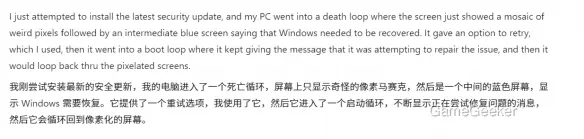
User Vagabond Superstar's experience is most representative: an HP Pavilion 590 desktop with a Ryzen 5 2600 processor, 32GB RAM, and GTX 1080 Ti graphics card—not a weak configuration—but after installing the update, it fell directly into a death loop: mosaic screen artifacts followed by blue screens, selecting retry leads to infinite restarts, like an endgame with no way out, each step deepening the predicament. Dell users L M and Thomas B, along with three of his colleagues, also encountered the same failure, unable to access work documents, with losses difficult to quantify.
Microsoft's AI assistant Assist speculates that the cumulative update corrupted boot-critical components or drivers, especially targeting certain AMD platforms. While this explanation is reasonable, it exposes Microsoft's shortcomings in compatibility testing. Thomas B restored his system by uninstalling the update, but one of his colleagues was completely unable to recover due to a corrupted recovery environment—this probabilistic failure feels more like gambling than engineering design.
In terms of strategic depth, Microsoft's recommended solution is to sequentially try System Restore, Startup Repair, and finally local reinstallation. This priority design is actually clever, but the problem is: why does a routine update require users to master such complex troubleshooting skills? For ordinary users, the learning cost of this process has already exceeded the value of the update itself.
From a risk management perspective, AMD platform users should postpone installing KB5083769 in the near term and wait for Microsoft to release a fix patch before updating. If already affected, prioritize entering the recovery environment to uninstall the update, avoiding direct system reinstallation that could lead to data loss. Microsoft's failure this time reminds us: while automatic updates are convenient, manually controlling the update pace at critical moments is the wiser choice—after all, system stability is far more important than fixing a vulnerability you may never encounter.





Comentários 0
Queremos saber sua opinião
Participe da discussão e compartilhe sua opinião sobre este jogo.
Ainda não há comentários. Seja o primeiro.